Poster
Bold launch graphic
A cinematic poster with the exact text "IDEOGRAM 4.0", bold white typography, neon city background, high contrast lighting.
 Ideogram 4.0
Generate online
Use the embedded generator below to create images from prompts. If the app is waking up or busy, generation can take a little longer.
Online AI image generator
Create posters, typography graphics, product visuals, logos, and design concepts with Ideogram 4.0 directly in your browser.
Prompt starters
Copy a prompt, paste it into the generator, then adjust the wording, style, layout, or colors for your own image.
A cinematic poster with the exact text "IDEOGRAM 4.0", bold white typography, neon city background, high contrast lighting.
A clean logo concept for a coffee brand named "NOVA BEAN", minimal vector style, warm cream background, balanced typography.
A premium product ad for wireless headphones, headline copy "FEEL EVERY BEAT", dramatic lighting, black and electric blue palette.
A square Instagram graphic with the headline "SUMMER DROP", tropical colors, clean editorial layout, crisp shadows, modern type.
What you can create
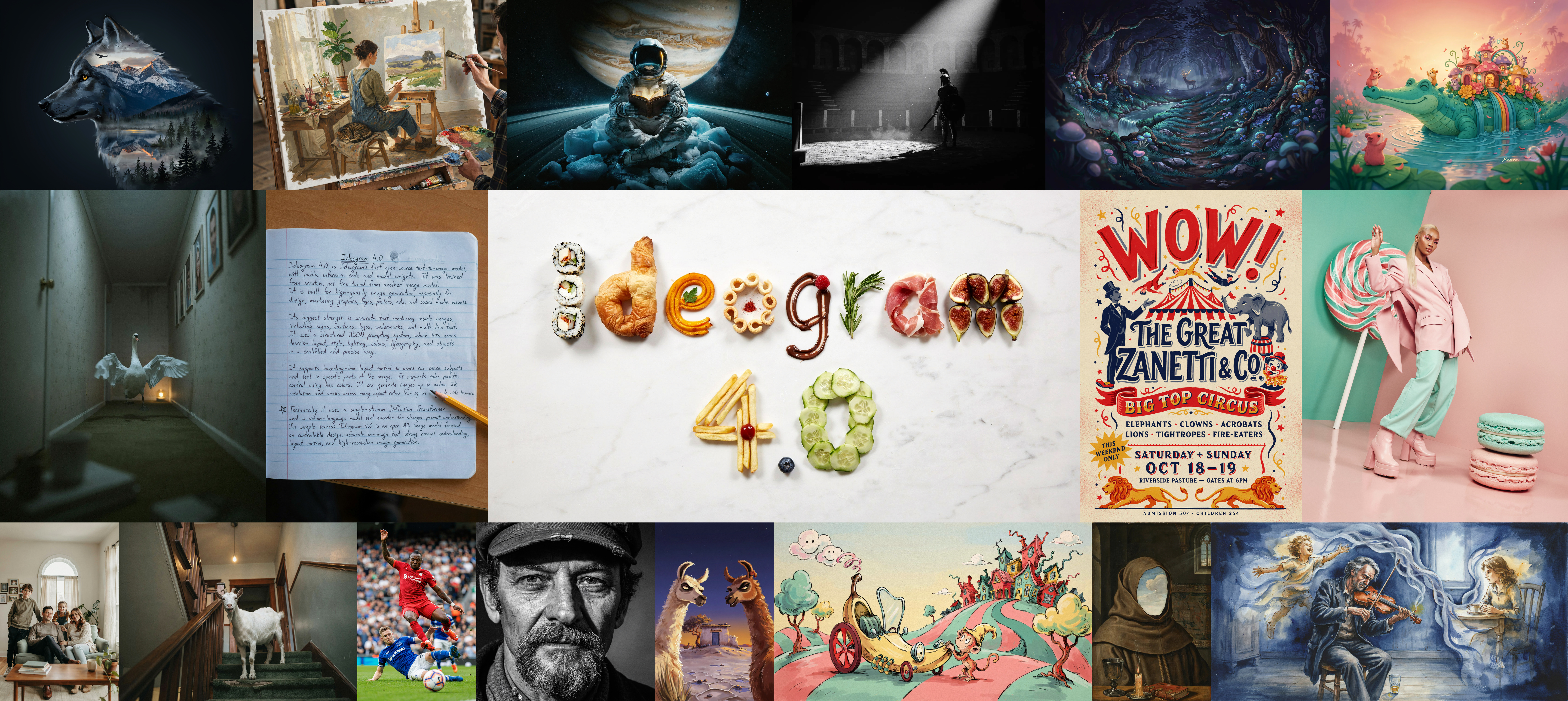
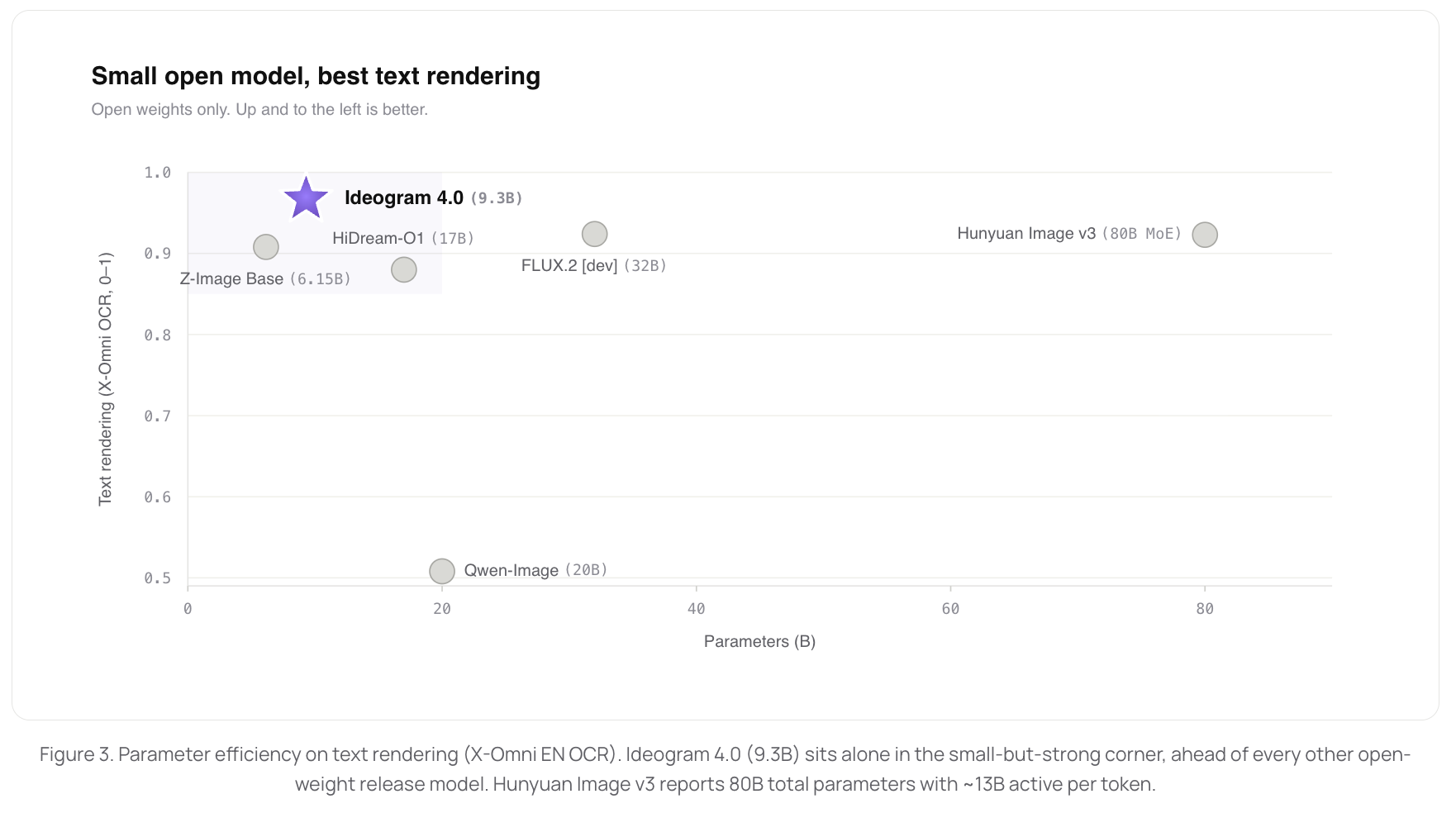
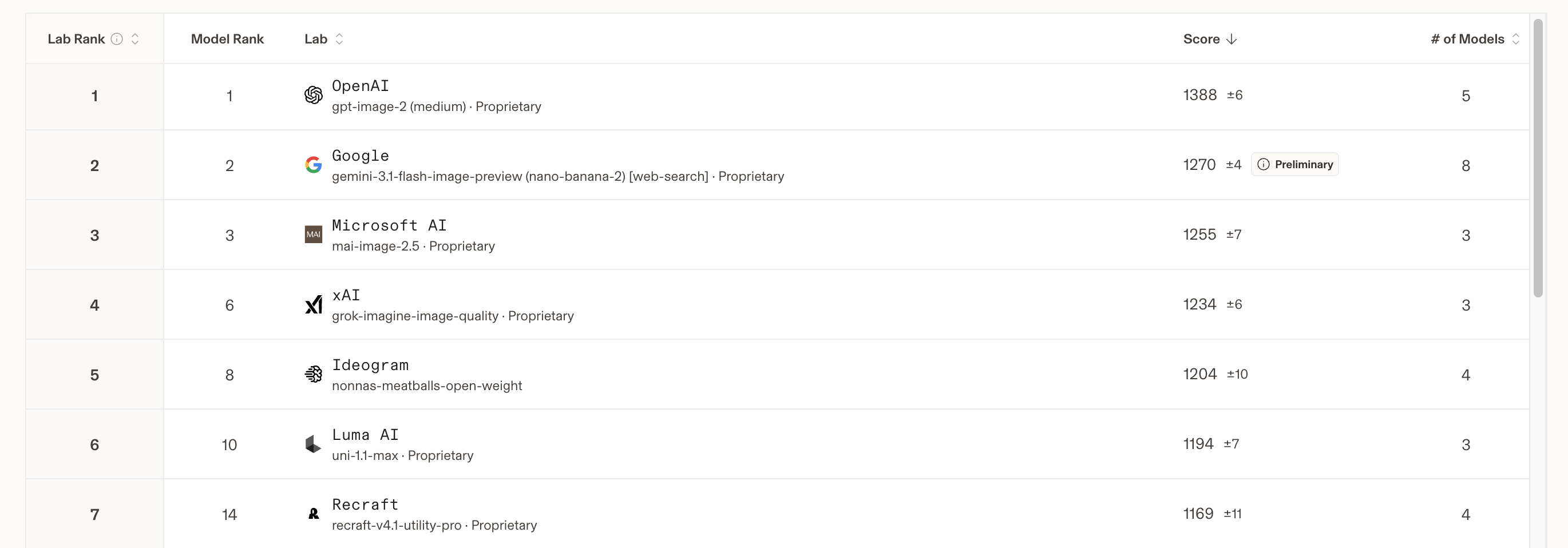
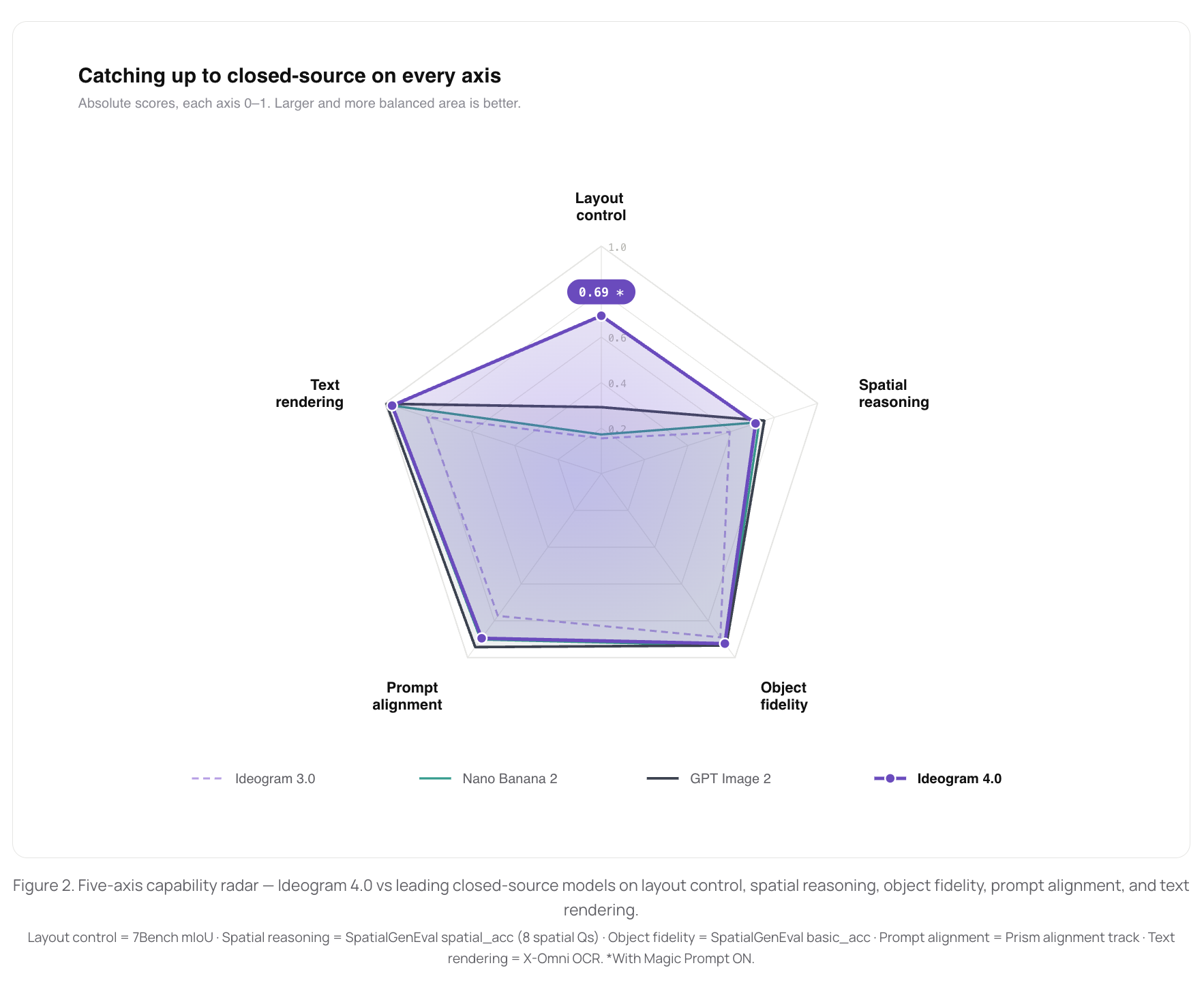
The official release describes Ideogram 4.0 as a text-to-image foundation model trained from scratch with strong multilingual typography, structured prompts, layout control, color palette guidance, and native 2K image support. For users, that matters most when the image is not just decorative, but needs to communicate a message.
Generate posters, signs, captions, badges, and covers where words are part of the visual idea. Keep the main words short, put them in quotation marks, and say whether they should appear as a headline, label, storefront sign, package mark, or logo-style type.
Create product ads, thumbnails, launch graphics, social posts, and campaign concepts in minutes. Include the product, headline, audience, lighting, surface material, and color palette so the generator has enough visual direction to make a coherent result.
Test composition, foreground placement, headline hierarchy, and color direction before production work. Describe where the subject sits, where the text sits, how much empty space you need, and whether the image should feel editorial, cinematic, minimal, playful, or premium.
Workflow
Instead of writing one long vague prompt, build your Ideogram 4.0 request in layers. This makes the result easier to evaluate and easier to improve after the first generation.
Say what the image is for: a poster, product ad, album cover, storefront sign, logo concept, YouTube thumbnail, app hero image, or social media announcement. The format helps the model choose composition and visual hierarchy.
Put important words in quotation marks. For example, use "OPEN STUDIO" or "WINTER SALE" rather than describing the words indirectly. Short copy usually gives Ideogram 4.0 a clearer target.
Describe the subject, background, lighting, camera angle, materials, and mood. If you want a clean design, ask for negative space and a simple background. If you want drama, specify contrast, shadows, and atmosphere.
After a result appears, change one thing at a time: shorter wording, clearer placement, different palette, simpler background, or stronger format. This makes prompt iteration faster and less random.
Better results
Ideogram 4.0 was released with an emphasis on structured JSON captions, but you do not need to start with JSON to use this page. Plain prompts work well for quick experiments. When you need more control, write the prompt as a clear checklist: format, copy, subject, layout, style, colors, lighting, and output size.
Prompt guide
These patterns are based on the Ideogram 4.0 capabilities described in the official release materials: typography rendering, spatial layout, color palette conditioning, and design-oriented generation. Use them as practical starting points rather than fixed formulas.
Use Ideogram 4.0 with a short headline, a clear visual subject, and a design style. Example structure: poster for an event, exact headline, central image, background mood, color palette, typography style, and whether the layout should be clean or busy.
Ask Ideogram 4.0 for a concept, not a final brand asset. Include the brand name, industry, personality, preferred style, and background. Review spelling carefully, then refine the strongest direction in a design tool before using it in production.
Describe the product, the surface it sits on, the lighting, the headline, and the desired feeling. Product prompts work better when the image has a single hero object instead of many competing objects.
Keep each line short and specify the language clearly. For signs and storefronts, ask for realistic materials, viewing angle, and environment so the text feels naturally placed instead of pasted on.
Name the format, such as square post, story graphic, banner, thumbnail, or cover image. Include safe empty space for the headline if you plan to add extra text later.
When composition matters, describe positions in plain language: headline at the top, product centered, subject on the left, empty space on the right, background pattern behind the copy, or badge in the corner.
Use cases
This page is built for quick Ideogram 4.0 experimentation in the browser. It is useful when you want to test an idea before opening a design file, compare several directions, or quickly see whether a copy-heavy concept is worth refining.
Create event posters, movie-style concepts, typographic art, and announcement graphics. This is a strong fit when the image needs one clear headline and a memorable visual mood.
Explore wordmarks, badges, brand marks, and visual directions before refinement. Treat outputs as concept sketches, then polish the best one manually for final use.
Make polished advertising visuals with headline copy and product-focused composition. Use it for campaign exploration, moodboards, hero-image ideas, and creative variations.
Generate thumbnails, square posts, story graphics, banners, and campaign visuals. Ask for the target format so the image composition matches where it will be used.
Before you generate
The embedded app runs through a Hugging Face Space, so the experience can depend on server availability, queue length, model loading, and the selected quality mode. This does not change the value of the generator, but it helps to know what is happening when the page appears slow.
If the embedded app is sleeping or many people are using it, the first load may take longer. Wait for the interface to appear before submitting a prompt, and avoid repeatedly refreshing while a generation is queued.
The Space may offer speed and quality settings. Faster modes are better for prompt exploration. Higher-quality modes are better after you already know the subject, copy, layout, and color direction you want.
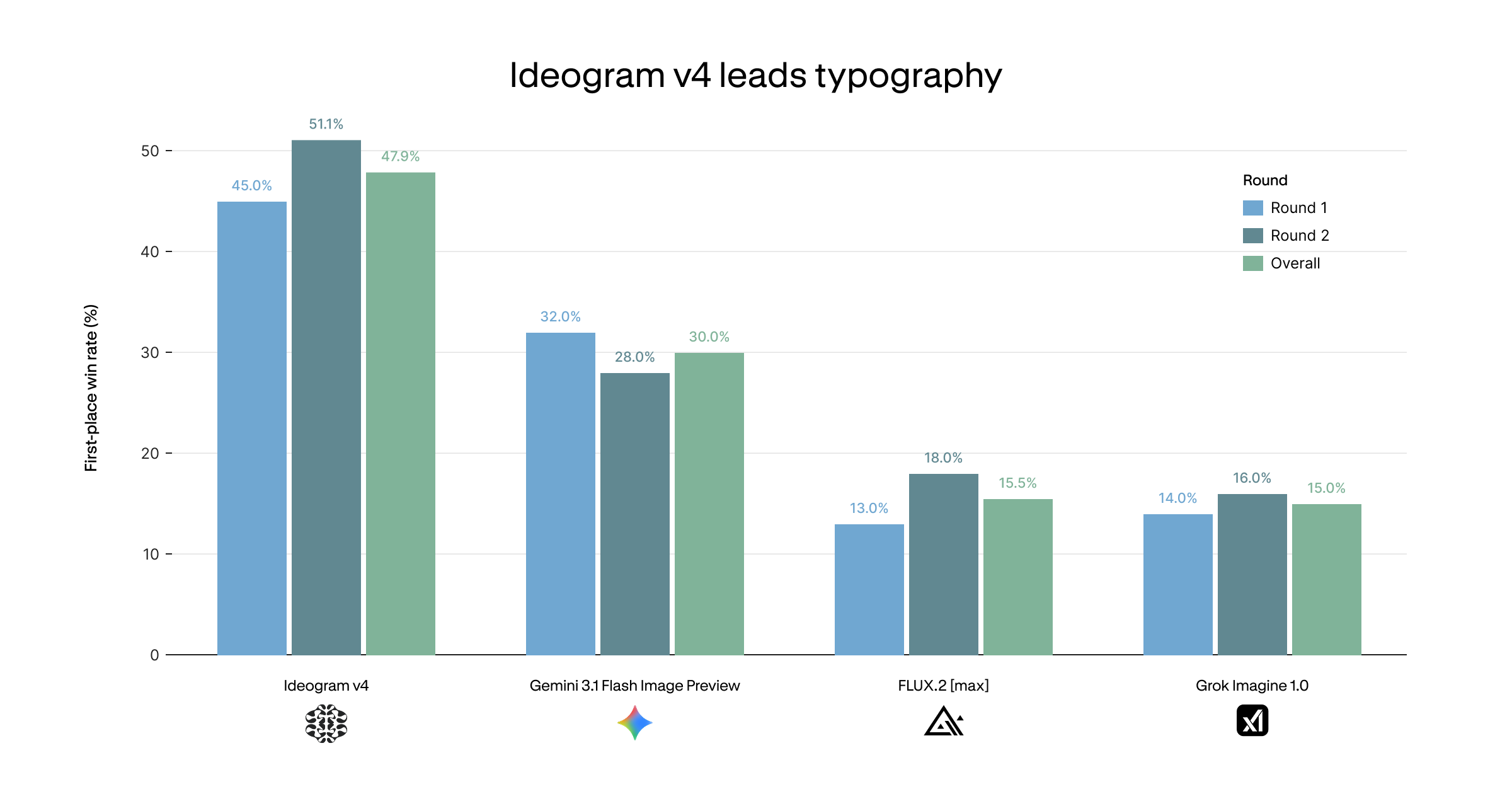
Ideogram 4.0 is known for stronger in-image lettering than many image models, but every generated image should still be reviewed. Check spelling, repeated letters, punctuation, and whether the wording matches your requested placement.
FAQ
These answers focus on practical use of the online generator, based on official model information and the behavior of the embedded Gradio app.
It is an online AI image generator that lets you create images from prompts directly in your browser.
It is especially useful for design-focused images such as posters, signs, logos, captions, product ads, and visuals that need readable lettering.
You can use plain prompts on this page. Official materials explain that Ideogram 4.0 benefits from structured JSON-style captions, but plain prompts are a good way to start. For better control, make your plain prompt structured by listing the format, exact copy, subject, layout, style, colors, and lighting.
Put the exact words in quotation marks, keep key copy short, and describe where the wording should appear in the composition.
Yes, it can help create logo concepts, wordmarks, badges, and brand-style directions. Use generated logos as visual drafts. For a real brand identity, check spelling, simplify shapes, confirm uniqueness, and refine the design manually before publishing it.
Include the product, headline text, target mood, surface, lighting, background, camera angle, and palette. A focused prompt such as a single product with one headline usually works better than a scene with too many objects and multiple slogans.
Use one short headline, a clear subject, and a specific visual style. For example, describe whether the poster should feel cinematic, editorial, minimal, retro, luxury, futuristic, or playful. Add where the headline should appear and what colors should dominate.
Official release materials mention native 2K image support and flexible resolutions. The exact options available on this page depend on the embedded Space interface and its current settings.
The generator is embedded from a public Gradio Space, and some internal app labels may appear inside that embedded interface. You can still use the generator on this page without leaving the site.
No. Ideogram 4.0 is embedded on this page, so you can try it online without local setup or command line tools.
Generation speed depends on server load, queue length, image size, and whether the embedded app needs to wake up.
Use Ideogram 4.0 images as drafts, creative directions, or starting points. Before using a result in client work, review copy accuracy, visual details, brand fit, and any rights or policy requirements that apply to your project.